Dynamic Workflows and Security Guidance integration into SST3-AI-Harness
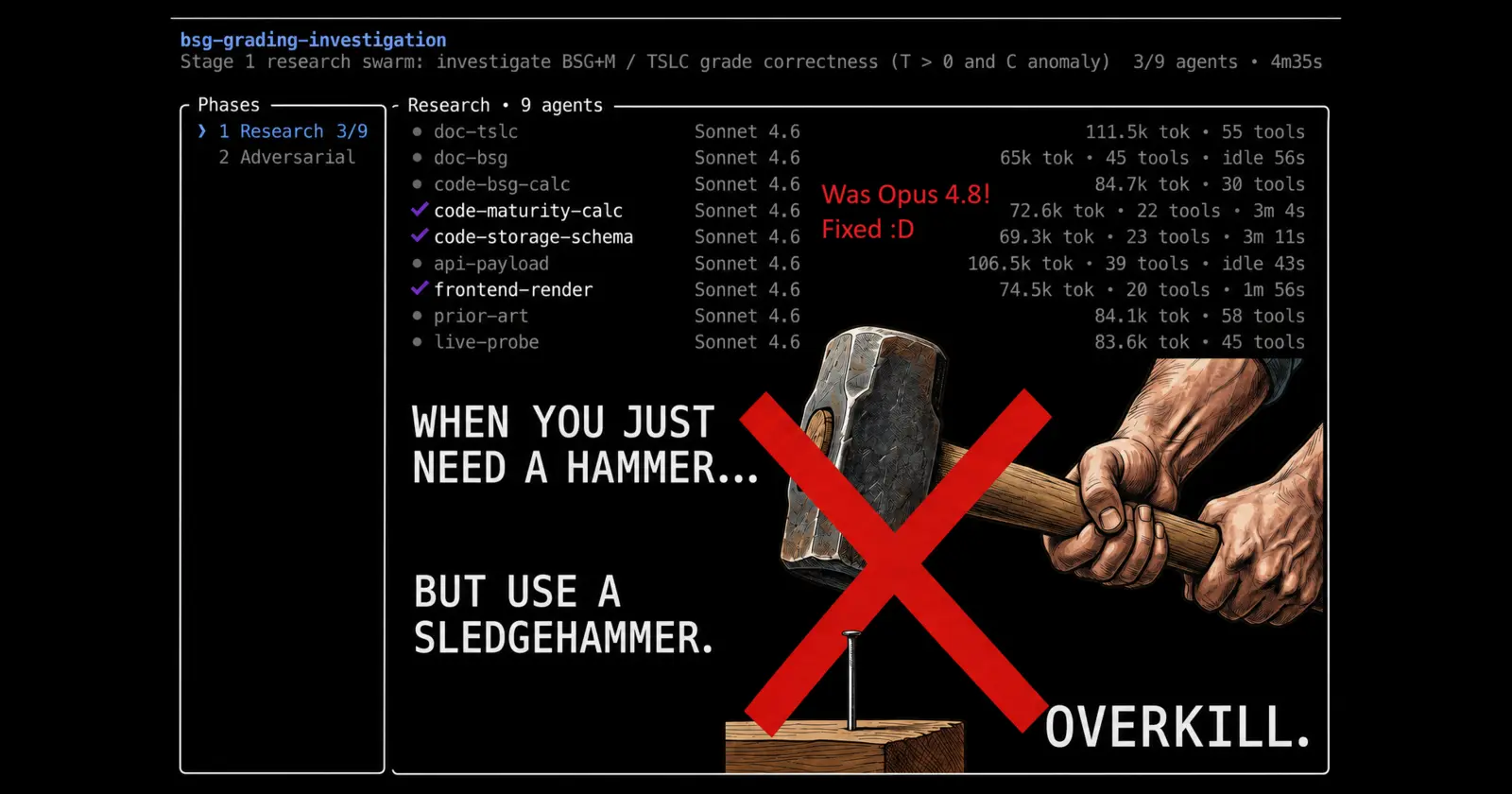
When Opus 4.8 dropped (Claude’s biggest model, the one I lean on most), I did what I always do with a new release. Read the notes. Got a bit fidgety. Two features jumped out at me: Dynamic Workflows and Security Guidance.
I’m not going to explain what they are in full. The official Claude docs do that better than I can, go read them. What I can give you is my own read on why they’re useful, and what happened when I bolted them into my own setup. Because one of them I’d basically been hand-building for six months. And the first time I really used it, it torched half my weekly token allowance in four repos.
Let me take a step back.
The gap I’d been filling by hand
For the last six months my whole workflow, SST3-AI-Harness, has leaned on one pattern. One main agent running the show (the “orchestrator”, the AI that holds the plan), firing off a swarm of smaller helper AIs (“subagents”) to do the heavy reading.
The trick was slicing. A big job (review this entire codebase, find every gap) is too much for one AI’s memory. So the orchestrator chops the work into bite-sized chunks (this folder, those files, this one angle) and hands each chunk to its own subagent. Each subagent stays focused on one simple thing, well inside its memory limit. Then the orchestrator collects all the findings back and makes sense of them.
Sound familiar? It should. I’ve read enough to know other people building their own harnesses landed on more or less the same shape. We all saw the same gap in how the general Claude setups worked, and we all reached for the same fix. Funny how that goes.
I try not to compete with Claude on this stuff. They sit on a mountain of data about how people actually use their tools, and they use it heavily inside the company too. They see the gaps. So when they shipped an official version of what my harness had already been doing for half a year, my honest reaction was relief, not annoyance. My own version worked fine, but theirs means it is one less thing I have to maintain. At least I know I was barking up the right tree.
It doesn’t fully replace what I built in my SST3 harness, but it slots right into it.
Then I plugged it in
Dynamic Workflows is Claude writing its own little orchestration program, on the fly, every single time you run it. It looks at your actual repo, writes a script (in JavaScript, the programming language) spelling out exactly which subagents to spawn and in what order, then a runtime executes that script in the background. “Dynamic” because nothing is pre-written. It builds a fresh plan for every job.
I use it at three points in my own five-stage workflow. The research stage, the triple-check stage, and the final review stage. The bits that are all about reading wide and reporting back, which is exactly what a swarm is good at.
So I dogfooded it on fourteen repos. (Dogfooding: using your own thing in anger to find where it breaks, instead of just trusting it works.) Full-repo reviews, every one of my repos, one at a time, a few running in parallel. Smallest and simplest first, the heaviest one (my live automated trading system) saved for last, because size and complexity are not the same animal and I wanted the process polished before it touched the scary one.
By the fourth repo, half my weekly token allowance was gone.
Half. Four repos. On a Max 20x plan, the big one.
And it kept throwing this at me, over and over:
API Error: Server is temporarily limiting requests (not your usage limit) · Rate limited
Which made no sense to me. The feature is built to run a real swarm, up to a thousand subagents across one run, sixteen of them going at once. When I checked the live state (there’s a /workflows view that shows you exactly what’s running), I was using somewhere between 5 and 20 subagents total, including the second-pass cross-check. Hardly stress-testing it. And yet, rate limited. Repeatedly. Burning tokens, then falling over halfway, forcing a restart.
There were even a few times Claude told me it hadn’t actually run the workflow, so no tokens were spent. Not true in every case. Sometimes it had clearly fired it off, eaten the tokens, then died on the rate-limit error mid-run. Tokens gone, nothing to show for it.
I was not happy.
What I had wrong about it
Before I get to the fix, a confession. I’d misread parts of how this thing works, and I bet I’m not the only one.
First: it’s not in the cloud. I’d assumed Dynamic Workflows shipped the whole repo off to Anthropic’s servers and ran it there. Nope. It runs locally, in the background of your own session, on your own machine. The cloud one is a different feature (/code-review ultra), which does upload your repo and bills you for the privilege. Two separate things. Easy to mix up.
Second: the subagents don’t talk to each other. I’d assumed they cross-chatted, comparing notes like a little team. They don’t. Each one reports its findings back to the orchestration script and that’s it. One orchestrator collects everything, same as the model I’d already built by hand. The feature where AIs genuinely message each other is a different one (Agent Teams), still experimental and off by default. I’d mashed the two together in my head.
Third: there’s no magic verification loop baked in. I’d half-assumed the workflow checked its own homework. It doesn’t, not on its own. If you want a second pass that double-checks the first, you write that into the script yourself. Which I do. But that’s me building it, not the feature handing it to me.
None of this is a dig. The feature is genuinely good. I’d just swallowed a slightly wrong picture from skimming, and getting it straight mattered for the next bit.
The actual fix: stop swinging a sledgehammer at everything
Here’s the thing that was really burning my tokens.
By default, Dynamic Workflows inherits whatever model your main chat is on. Mine’s usually Opus, the biggest, smartest, most expensive Claude. So every single subagent in every swarm was an Opus. The fast cheap reading jobs, the dumb “list every file in this folder” jobs, all of it. All running the heaviest model.
That’s swinging a sledgehammer to knock in a panel pin. It works. It’s also mad.
The one real lever you get is the model. You can route different subagents to Haiku (the small fast cheap one, 200K memory), Sonnet (the mid one, 1M memory now), or Opus (the big one, 1M memory). You can’t, annoyingly, tune the effort per subagent yet (how hard each one thinks), that’s still set across the whole session. But the model choice alone is a massive knob.
So I went back and refactored SST3 again. Added proper model control, picked per task and per stage of the workflow. A simple “read this folder and tell me what’s in it” job? Haiku. Logic checks? Sonnet. The deep architecture-level reasoning? Opus, and only Opus. Match the tool to the size of the nail.
What changed
I started the next run with the heaviest repo first this time, the live trading system, because I was low on weekly usage and wanted that one done and back in production.
Night and day. The 5-hour window and the weekly limit suddenly behaved how I’d expect. Watching the swarm now, a mix of Haiku, Sonnet and Opus depending on the job, it just feels right. It made no sense to throw Opus at everything. Small hammer for small nails. That is the way.
Then a nice surprise. Claude reset my weekly limit. Turns out they’d had a bug somewhere burning more tokens than it should, and the reset happened to land in my favour. Perfect. I spent the rest of the day clearing the remaining repos.
And the result I actually cared about: barely anything broke. After a full review and refactor pass across every repo, there were very few fixes needed. Which tells me the stuff was designed and built solidly in the first place. Nothing fell over after a top-to-bottom review. I’ll take that. (Nobody else is going to say “great job Hoi”, so I’ll say it myself. :D )
What I’d tell anyone running their own harness
If you’ve built your own setup on top of Claude, do the model thing if you plan to integrate the Dynamic Workflows feature into your harness. Seriously. Don’t let your workflow default every subagent to your biggest model. You’ll burn a frankly stupid amount of tokens for no good reason. Pick the model per job. The cheap reading tasks do not need the big brain.
I do hope Anthropic adds per-subagent effort control before long. Right now I can pick the model, but not how hard each subagent thinks. Give me both and the whole cost-versus-value balance gets genuinely fine-grained. It would be great too if the subagents could cross-talk to each other like Agent Teams.
As for Security Guidance, the other new feature? Honestly, not much to report. It sits in the background, looking over code as it’s written and flagging anything dodgy. It’s quiet and not very transparent about what it’s up to, so I’ve not formed strong opinions either way. It does its thing. Fine for now.
Dynamic Workflows, though, I’m genuinely pleased with. I wouldn’t call it a proper upgrade on my own swarm, but it gave me one thing I never had: I can actually watch what the subagents are doing while they explore and plan across a whole codebase. My own hand-rolled swarm ran in the dark.
One gripe remains. I still get that rate-limit error even after the second refactor, so I reckon it’s unrelated to anything I changed. My best guess: I usually run between four and eight Claude chats at once depending on what I’m working on, and Max 20x or not, hammering Anthropic with that many parallel workflow connections probably rubs something the wrong way. Feels a bit silly to advertise handling vast swarms of subagents when I’m tripping a limit well before I get anywhere near the numbers on the tin. I hope they sort it.
But that’s a small gripe on top of a feature I’d wanted to exist for six months. The funny part is I’d already built my own version, it worked fine, and Anthropic shipping the official one means I can finally stop maintaining my hand-rolled version and just use theirs. Turns out I was barking up the right tree with my harness architecture all along. Quality and the right tool beat raw scale, every time. Don’t bring a sledgehammer to a panel pin.